Consta
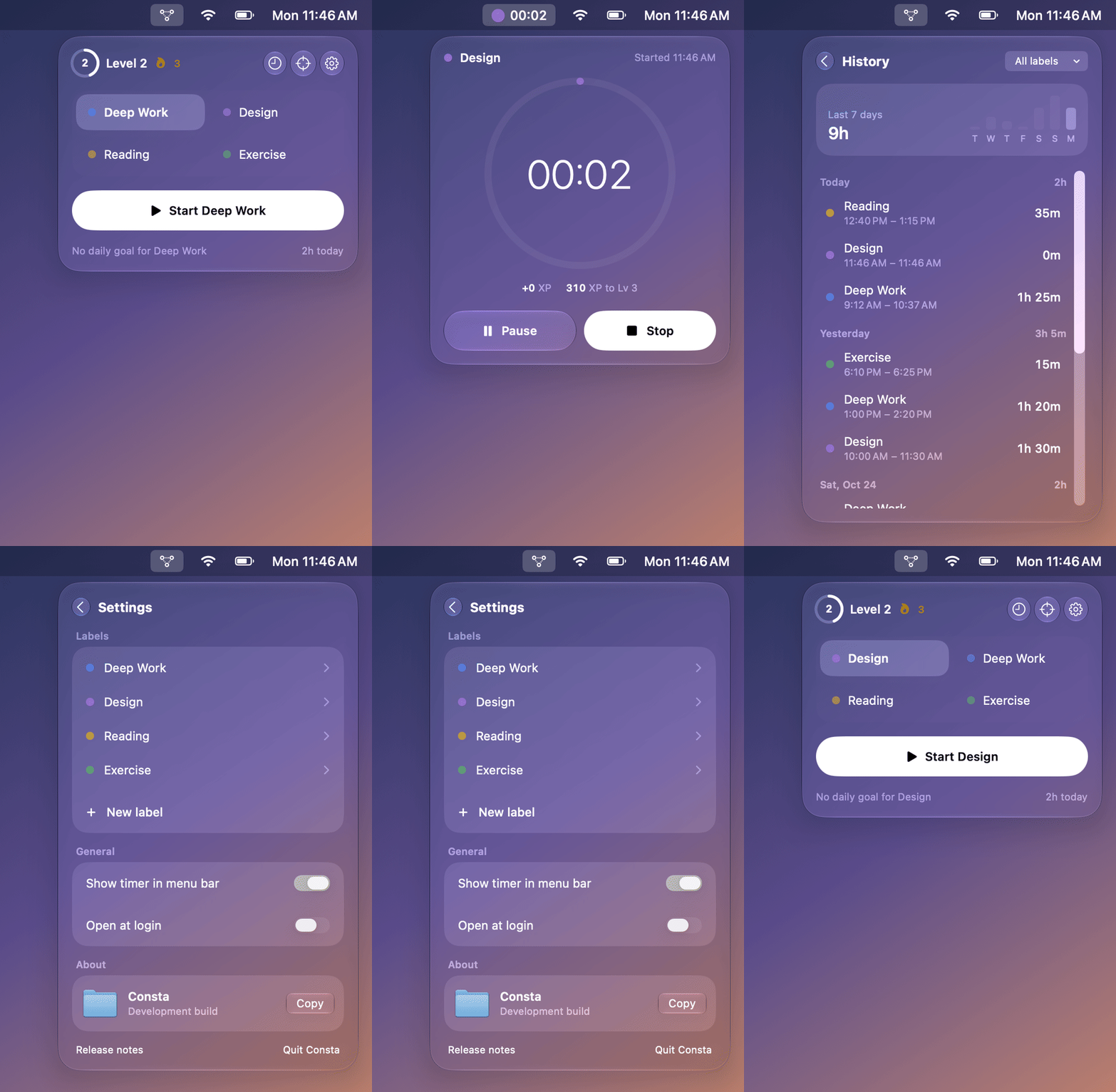
Focus sessions that live in your menu bar. Pick what you're working on, press Start, and let XP, streaks and badges make the time feel like progress.
The problem
Most time trackers feel like timesheets. They're good at recording hours and bad at making you want to come back tomorrow. The friction starts before the work does: open an app, find the project, start a timer, then remember to stop it.
The bet with Consta: if starting a session takes one click and every focused minute visibly adds up to something, deep work starts to feel like progress instead of bookkeeping.
Key decisions
Consta has no Dock icon and no main window. You pick a label, press Start, and a live timer sits next to the menu bar icon. Pausing, resuming and stopping all happen without leaving what you're doing, which keeps the cost of starting close to zero.
The rules are simple enough to keep in your head: 1 XP per focused minute, +50 for meeting a daily goal and +200 for a weekly one. The level curve (250 × level + 50 XP to the next level) means an hour a day levels you up every few days early on and every couple of weeks later. Nine badges reward different kinds of focus: a 2-hour session, a 5-day streak, 10 hours on one label, starting before 7 AM.
When you stop, Consta works out the XP, goal bonuses, new badges and any level-up first, then lets you keep or discard the session. Bonuses are keyed to the goal and period so they're paid once. Streaks count through yesterday until you log something today, so a streak isn't "lost" at midnight.
Everything is stored on your Mac with SwiftData. There's no account and no server, so there's nothing to sign up for before your first session.
How it's built
The game rules live in their own package, ConstaKit: the level curve, XP rules, goal progress and streaks, badges, and the evaluator that works out what a session earns. It has no UI or persistence, so every rule is unit-tested on its own. The SwiftUI app on top is thin: SwiftData models, a session stopwatch, and one view per screen, styled with Liquid Glass.
Debug builds also include a small scripted UI driver that can open the popover, click, type and take screenshots against an in-memory store. That made it possible to capture every screen for review without touching real data.
Shipping it
A menu bar app is only useful if people can install it, so distribution got as much attention as features. Pushing a version tag runs a release workflow that tests, builds a DMG and attaches it to a GitHub release. Releases after v0.2.0 are signed with a Developer ID and notarized by Apple, so Consta opens like any other app instead of hitting a Gatekeeper warning on first launch.
Open questions
- Do badges keep motivating after the first few, or do goals and streaks do the real work?
- Is 1 XP per minute the right base rate, or should longer unbroken sessions be worth more?
- What would it take to bring the same loop to iPhone without giving up "no account, no server"?